Most marketers are still treating Claude like a fancy Google search. Here’s what you’re missing.
I’ve been in digital marketing for over a decade. I have witnessed the rise and fall of various tools, and I have honed a keen ability to distinguish between those that truly make a difference and those that merely sound impressive in a LinkedIn post.
Claude Code is different. Not because of the hype around it, but because of how it actually changes the way I work day to day.
When I first started using it, I was doing what most marketers do: typing prompts, getting outputs, and copy-pasting them into documents. That’s using a Ferrari to go grocery shopping.
The real shift happened when I started building a system around it. Now I don’t just use Claude. It runs alongside my entire marketing operation.
Here’s exactly how that works.
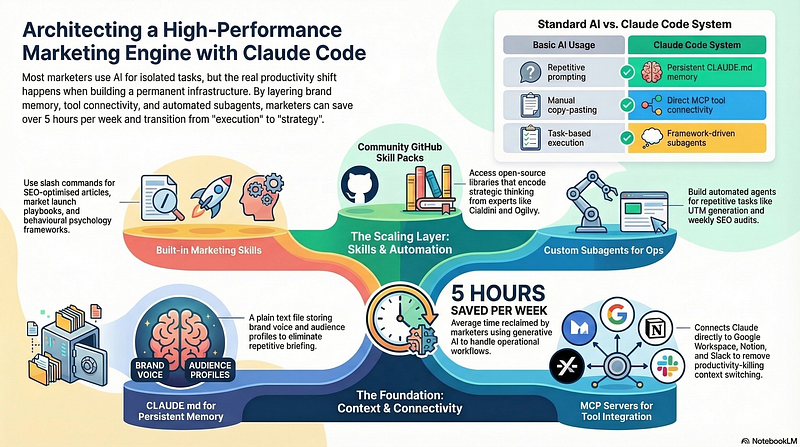
Claude Code goes far beyond chat prompts. By combining CLAUDE.md for persistent brand context, MCP servers that connect to your actual tools, built-in marketing skills, community-built GitHub skill packs, and custom subagents, marketers can operate with the output of a full team. According to Salesforce (2025), marketers using generative AI save an average of 5 hours per week — this stack gets you well beyond that.
Why Most Marketers Are Using Claude Wrong
According to HubSpot’s 2025 AI Trends for Marketers report, 66% of marketers are already using AI in their roles. But the same research shows most of them are using it for isolated tasks—draft this email, summarize this report, write this social post.
That’s useful. But it’s not a system.
The gap between marketers who are saving a few minutes here and there and the ones who feel like they have a full team working alongside them comes down to one thing: infrastructure. How you’ve set Claude up, what it knows, and what it can reach.
The rest of this article is about building that infrastructure.
Start With CLAUDE.md: Give Claude a Permanent Memory
The first thing I did that changed everything was creating a CLAUDE.md file.
Before I had this setup, every single session started the same way. I’d explain my brand voice. I’d describe my audience. I’d paste in product positioning I’d written a dozen times before. It was like briefing a new freelancer every morning.
CLAUDE.md fixes that. It’s a plain text file that sits at the root of your project, and Claude reads it at the start of every session. You define your brand voice, your ICP, your messaging hierarchy, your campaign rules, and any context Claude needs to do good work.
For me, that file includes
- My brand tone (casual and direct, no corporate-speak)
- Target audience profiles with their actual pain points
- Competitor positioning and what differentiates us
- Rules for what we never say and how we frame our value
Once it’s in there, I don’t explain context anymore. I just work.
This is probably the lowest-effort, highest-impact thing you can do before anything else. Set it up once. It pays back every session.
MCP Servers: How Claude Actually Connects to Your Stack
Here’s where things get more interesting.
MCP (Model Context Protocol) servers are what let Claude stop being an isolated chat tool and start working inside your actual marketing stack. Think of them as connectors that give Claude direct access to the tools you already use.
The ones I use most often:
Google Workspace MCP lets Claude read briefs from Drive, update campaign tracking in Sheets, and draft emails in Gmail directly. No copy-pasting between windows. The whole workflow stays in one place.
Notion MCP means Claude can pull from and write to my content calendar, campaign briefs, and project docs without me having to extract anything manually.
Slack MCP is useful for summarizing long threads, drafting team updates, and automating notifications when a campaign milestone is hit.
Airtable MCP connects Claude to my content pipeline database. I can ask it to query what’s in review, flag overdue items, or pull a report on publication cadence.
Brave Search MCP gives Claude live web access. This is the one that makes real-time competitive research and trend analysis possible without switching tools.
The thing most people miss about MCP servers is that they’re not about making individual tasks faster. They’re about removing the context-switching that quietly kills productivity across a whole day. When Claude can reach your tools directly, you stop being the connector between systems.
Built-In Marketing Skills: One Command, Full Output
Claude Code has a library of marketing-specific skills that run as slash commands. These aren’t generic prompts. They’re structured workflows built for specific marketing jobs.
The ones I come back to most:
/blog-write produces full SEO-optimized articles structured for Google rankings and AI citation readiness. Not generic content—strategically built, with headings, stats, and schema in mind.
/social-content creates platform-native posts for LinkedIn, Instagram, and X. It builds in hook frameworks, content pillars, and engagement strategy rather than just generating text.
/seo-audit runs a full site audit covering crawlability, technical issues, content gaps, and ranking opportunities. What used to take an agency a week takes minutes.
/market-launch builds a complete product launch playbook—strategy, channels, messaging framework, and timing—as a single output.
/paid-ads generates ad creative, headlines, and copy variations for Google, Meta, and LinkedIn. Useful for scaling creative testing without scaling headcount.
/email-sequence builds full drip campaigns and lifecycle flows, not just individual emails.
/page-cro analyzes landing pages and produces rewrite recommendations grounded in conversion principles.
/marketing-psychology applies behavioral science—loss aversion, social proof, anchoring, scarcity framing—directly to your copy and campaign structure.
According to CoSchedule’s 2025 State of AI in Marketing report, 83% of marketers using AI report increased productivity since adoption. Skills like these are why. They collapse the gap between “I need this output” and “this output is done.”
GitHub Skill Packs: What the Community Has Built
Beyond the built-in skills, there’s a growing ecosystem of community-built skill packs on GitHub that are worth knowing about.
These are open-source collections built specifically for marketing use cases, and some of them are remarkably good.
coreyhaines31/marketingskills is the most-forked marketing skill set for Claude Code. It covers CRO, copywriting, SEO, analytics, and growth engineering. One of the things I like about it is the automatic skill routing—type “optimize this landing page," and it activates the right skill without you needing to remember the command.
zubair-trabzada/ai-marketing-claude uses parallel subagents, so when you run /market audit <url>, you get five agents running simultaneously: content analysis, CRO, SEO, competitive positioning, and brand scoring. The output is a client-ready PDF report.
alirezarezvani/claude-skills has over 5,200 GitHub stars and covers 192+ skills across marketing, product, engineering, and executive advisory. It’s the most comprehensive open-source library in the ecosystem right now.
clawfu/mcp-skills is built on frameworks from Ogilvy, Cialdini, Schwartz, and Dunford. What makes it stand out is brand memory—Claude remembers your positioning and messaging across sessions even beyond what’s in your CLAUDE.md.
wondelai/skills has 25 agent skills for marketing, CRO, UX, sales, and growth, grounded in books by Hormozi, Ries, Norman, and Cialdini.
devmarketing-skills is built for developer marketing specifically—HN strategy, technical tutorials, Reddit engagement, docs-as-marketing, and SEO for devtools. If your product has a technical audience, this one is worth adding.
The thing about these skill packs is that they encode strategic thinking, not just task execution. The frameworks from Cialdini and Dunford aren’t just name-drops. They’re baked into how the skills structure outputs. That’s a meaningful difference from a generic AI prompt.
Subagents: Building Your Always-On Ops Team
This is the part of the stack that most marketers haven’t gotten to yet.
Subagents are automated agents you build for tasks you repeat on a regular schedule. You save them to .claude/agents/ and deploy them on demand.
The ones I’ve built:
A UTM generation agent that takes a campaign brief and outputs a full UTM taxonomy, formatted and ready to use. This used to take me 20 minutes per campaign. Now it takes 30 seconds.
A campaign reporting agent that pulls data from the relevant sources, formats it into a summary, and drops it into my Notion workspace. I run it every Friday.
An A/B test analysis agent that takes raw test data, runs the significance calculations, interprets the results, and gives me a recommendation.
A weekly SEO audit agent that runs a lightweight check on my top-priority pages and flags anything that’s changed since the last run.
McKinsey’s 2024 State of AI report found that AI adoption in marketing and sales more than doubled year over year—the biggest jump of any business function. Subagents are a big part of why that’s accelerating. When you automate the repeatable ops work, you free up real cognitive space for the work that actually requires a strategist.
What This Stack Actually Changes
Salesforce research (2025) found that marketers using generative AI save an average of five hours per week—more than 32 days per year. That’s based on general AI tool usage. A properly configured stack like this moves that number higher.
But the bigger shift isn’t just time. It’s capacity for strategic thinking. When the execution layer is handled, you’re not spending your mental energy on tasks. You’re spending it on decisions.
That’s what I’ve noticed most in my own work. The difference isn’t that I produce more content faster. It’s that I have more room to think about whether we’re building the right content strategy at all.
The marketers I see building this kind of setup aren’t waiting for their company to give them a training program. Salesforce found that 70% of marketers say their employer provides no generative AI training. The people moving ahead are figuring it out themselves, building their own infrastructure, and compounding the advantage over time.
Where to Start
If you’re new to Claude Code, here’s the order I’d recommend:
- Set up CLAUDE.md first. Write down your brand voice, ICP, and any rules Claude needs to follow. This takes an hour and pays back every session.
- Install one MCP server. Start with whichever tool you live in most—Notion, Google Workspace, or Slack.
- Try two or three built-in skills. Pick the output you currently spend the most manual time on.
- Browse the GitHub skill packs. Start with coreyhaines31/marketingskills or alirezarezvani/claude-skills.
- Build one subagent. Pick the most repetitive task in your weekly workflow and automate it. Once you’ve done it once, you’ll want to do it for everything.
The stack isn’t complicated. It’s just a few layers of setup that most marketers haven’t taken the time to build yet.
That gap won’t stay open forever.
Are you using Claude Code for your marketing work? What’s the one thing you’d want to automate first?
Drop it in the comments.
Download my free LinkedIn Profile Audit Guide, your first step toward becoming visible, valuable, and unforgettable on LinkedIn.
Subscribe to my newsletter on SocialJJ.
Follow me on LinkedIn.
Follow me on Twitter.
Follow me on Instagram.